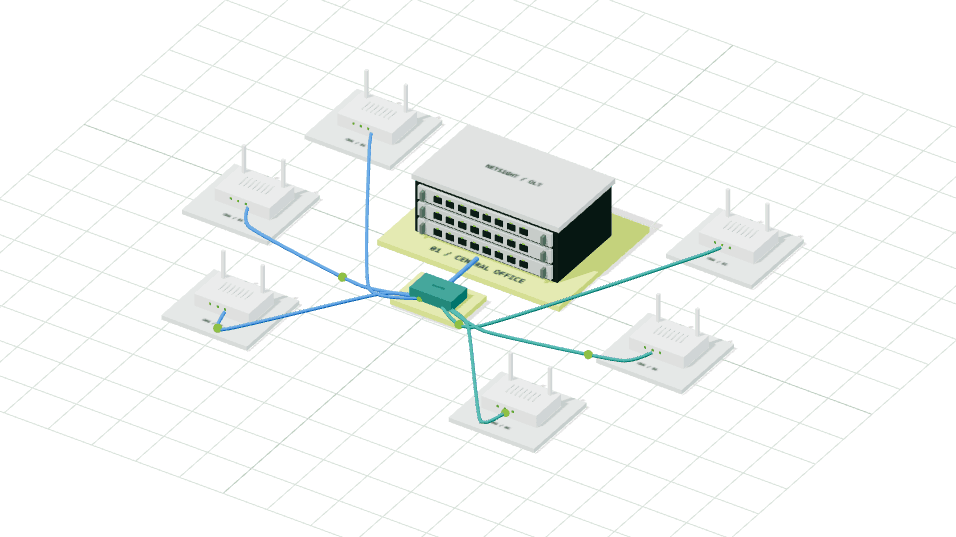
Topology graph & tree
Follow OLT, coupler, splitter, and ONU paths. Search devices, collapse branches, and inspect linked fiber routes.
Built for the connected world
Your network.
In perfect view.
From the first fiber to the last subscriber. Monitor, manage, and grow your FTTH network from one connected platform.
01 / The platform
Your network tells a story. Bring the signals, subscribers, and next steps into the same view.
See your OLTs, subscriber connections, and optical signals together. Find the detail you need without losing the bigger picture.
Follow OLT, coupler, splitter, and ONU paths. Search devices, collapse branches, and inspect linked fiber routes.
Compare measured RX power with the topology's optical estimate, including fiber loss and distance. Track signal history and uptime.
Bring supported OLT equipment into a consistent operational view.
Topology, in perspective
OLT to coupler. Splitter to subscriber. Explore the connections behind a network and compare estimated optical power with a measured reading.
The complete platform
Network monitoring, subscriber services, and the work around them. Explore the tools behind every part of your operation.
Monitor supported OLTs and subscriber ONUs, inspect PON ports, and connect device health with customer and service information.
Trace OLT, coupler, splitter, and ONU paths in graph and tree views, with device status, fiber routes, and optical estimates.
Follow ONU optical-power history, inspect OLT and ONU uptime, and use network reports to investigate service quality.
Monitor supported MikroTik routers, inspect interfaces, and review traffic alongside your FTTH access network.
Check ACS connection status, inspect subscriber equipment, and perform supported remote operations through GenieACS.
Manage broadband authentication, PPPoE users, active sessions, NAS devices, bandwidth profiles, and IP pools.
Manage broadband plans, subscriptions, invoices, and payments, with an operator-controlled self-service portal for subscribers.
Connect alert rules, technician tickets, customer notifications, and IVR call routing in your ISP support operations.
Organize operators and field teams with MSO/LCO workspaces, role-based features, attendance, location views, and mobile workflows.
Feature access depends on your organization and role. Device operations and integrations require compatible equipment and configuration.
Core Capabilities
All the tools you need to monitor, troubleshoot, and scale your fiber network — all in one intuitive platform.
Your Network at a Glance
Review ONU and OLT status, active alerts, open tickets, optical readings, and uptime. Data freshness depends on the configured collection schedule and device reachability.
See Every Device Location
Interactive map showing OLT and ONU geographic positions. Color-coded: Green=Online, Red=Offline, Yellow=Warning. Click any device for instant details. Pan and zoom to locate coverage areas and identify blackout zones.
Monitor Your Equipment Health
Real-time status, temperature readings, power supply status, PON port utilization, connected ONU count per port. View device logs, perform diagnostics. Supports VSOL, Syrotech, Huawei, Richerlink and TP-Link OLTs — plus OLTs on BSNL's network.
Complete Subscriber View
All customer ONUs in one searchable list. See: serial number, customer name, phone, address, network, status, RX power, distance. Filter by OLT, status, or search term. Edit customer info directly. Bulk operations like create tickets or assign plans to multiple ONUs.
Investigate Optical Changes
Review optical signal history for individual ONUs, compare quality categories, and investigate degradation alongside device status and topology. Historical readings support investigation, not guaranteed failure prediction.
Prove Your Service Quality
Compare OLT and ONU availability against configured SLA thresholds. Review daily uptime, status transitions, and device-level availability after monitoring has collected data.
Data for Decision Making
Review available network and operations reports. Export supported datasets for analysis and share relevant availability or billing information with your team.
Automatic Incident Detection
Admin creates configurable rules: ONU offline, RX power drops, bulk outages, OLT failures, fiber cuts. Operators see & acknowledge events. Notifications via Email, Webhook, or Telegram. Operators can't create rules (admin-only).
Track Issues End-to-End
Create tickets linked to specific ONUs. Attach RX power snapshot at incident time. Assign to technician. Add notes and diagnostics. Track status: Open → In Progress → Resolved → Closed. Everyone on team sees ticket history.
Fix Without Field Dispatch
Inspect GenieACS connection state and device parameters. Request supported remote reboots and refreshes. Available operations depend on CPE capabilities, firmware, ACS setup, and reachability.
Map Your Physical Network
Draw and track fiber cable routes across service area. Mark poles, conduits, splitters, and junction boxes. Identify which ONUs are affected per route segment. Plan maintenance routes. Expand network with confidence.
Understand Your Connections
Graph and tree views trace OLT, coupler, splitter, and ONU relationships. Search nodes, collapse branches, highlight upstream paths, link fiber routes, and compare measured with estimated optical power.
Scale Quickly
Import supported device datasets from CSV with validation feedback. Review records before import and keep device details aligned with the monitored inventory. Available to authorized administrators.
Manage Subscriptions
Track customer names, assigned plans, bandwidth limits, activation dates, status (Active/Inactive/Suspended). Link ONUs to customers automatically. Billing-ready data. Perfect for billing integration and service management.
Team Access Control
Configure organization and role-level feature access, including visible table columns. Platform and organization controls determine which tools each team can use.
Illustrative product views with sample data. Your workspace reflects your network, permissions, and enabled features.
Review the latest collected network status. Data freshness depends on polling configuration and device reachability. Start with:
Complete list of all customer subscribers. Search, filter, and manage all ONUs from a single interface:
| SERIAL | CUSTOMER | STATUS | RX POWER |
|---|---|---|---|
| 2C:C4:4F:5E | Demo-Customer-1 | PowerOff | — |
| 24:94:93:2C | Demo-Customer-2 | Online | -10.4 dBm |
| 64:2C:AC:D2 | Demo-Customer-3 | Online | -17.9 dBm |
Configured alert rules and notification channels help your team identify conditions that need attention:
Ready to see this in your network?
Sign in to your workspaceReal-time visualization of every OLT and ONU on an interactive map. See device locations, status, and signal strength at a glance.
GenieACS-based device management. Inspect ACS state and request supported remote operations with device and subscriber context close at hand.
Simple monthly pricing based on total OLT count.
If upto 2 OLT
₹500
per OLT / month
excluding radius
If 3 or more OLT
₹350
per OLT / month
excluding radius
For NetSight LCOs
Bring a new paying LCO to NetSight and earn 10% of their paid OLT charges as credit against your own bill, for their first 6 paid months.
At ₹350 per OLT/month, you earn ₹35 per referred OLT each paid month. More paying LCOs referred means more bill credit.
Contact us with your LCO name and the new LCO's details. Our billing team verifies referrals and applies earned credits to your bill.| Your bill: 4 OLTs | ₹1,400 |
|---|---|
| New LCO pays: 6 OLTs | ₹2,100 |
| Your credit: 10% of ₹2,100 | -₹210 |
| Your bill after credit | ₹1,190 |
You save ₹210 for each qualifying paid month in this example.
Define bandwidth plans, manage subscriptions, track customer commitments, and ensure SLA compliance for each subscriber.
Built for the Indian ISP model — manage your MSO (Multi-System Operator) and LCO (Local Cable Operator) hierarchy from a single platform. Complete subscriber management across all operators.
Multi-System Operators get a unified view of all LCOs under them. Monitor subscriber counts, revenue per LCO, network health, and SLA compliance across your entire operator network.
Local Cable Operators manage their own subscribers with a dedicated portal. Add customers, assign plans, monitor usage, raise tickets — all within their allocated scope and permissions.
Connect subscriber plans with supported access-provisioning workflows. Configure RADIUS, NAS devices, profiles, and permissions before enabling subscriber services.
Full-featured RADIUS authentication integrated directly into NetSight. No external FreeRADIUS setup needed. Manage PPPoE subscribers, bandwidth profiles, IP pools, NAS devices, and session monitoring — all from one interface.
Manage PPPoE subscriber authentication with compatible, configured NAS devices. Confirm the required attributes and session-control support for your equipment.
Create service profiles and apply supported bandwidth attributes. When changes take effect depends on the NAS and session-control configuration.
Define IP address pools per NAS or per plan. Track utilization, avoid conflicts, assign static IPs to premium customers. Full IPv4 pool management with real-time usage dashboard.
Register MikroTik routers, Huawei BRASs, or any NAS. Configure shared secrets, monitor active sessions per NAS, disconnect users remotely via CoA/DM packets.
Inspect active PPPoE sessions, IP addresses, NAS, duration, and available accounting data. Supported session-control operations depend on NAS configuration.
Complete audit trail of every login attempt — successful and failed. Debug authentication issues instantly. Filter by username, NAS, time range, or status.
Give subscribers a separate portal for enabled plan, billing, usage, connection, Wi-Fi, and support-ticket functions.
See how operators are running better networks with real-time visibility and intelligent automation.
Use optical history and topology context to prioritize connections that need investigation or maintenance.
Trace subscriber paths, compare optical readings, and use supported remote diagnostics before deciding on field work.
Fewer field dispatches. Remote diagnostics and fixes. Team works smarter, not harder. Scale without hiring.
Review measured availability against your configured SLA targets and share relevant operational reports.
Admin, operators, and field techs see same real-time data. Role-based access keeps everyone focused. Fewer surprises.
Bulk import thousands of devices. Auto-monitoring handles growth. Add ONUs without complexity.
Admins can customize permissions and visibility for operators and field technicians. Give everyone the right tools for their job.
Admin dashboard lets you choose which features each role can access:
Per-role visibility settings for each table (starting with ONU Fleet):
Everyone gets the right access. Admins control what features and data each role can see.
Organization Administrator
Full network control and team management
Network Operations Team
Network monitoring and incident response
On-Site Technician
On-site diagnostics and remote troubleshooting
💡 Pro Tip: Admins can customize what each role can see and do. The above is the default setup, but can be fully customized in the Settings → Role Permissions panel.
Confirm support for your model, firmware, management access, and required operations. See supported OLT models
Monitor OLTs deployed on BSNL's Bharat Fibre network — including those not directly wired to your own network.
Start with real-time visibility. Scale to hundreds of OLTs. Build the NOC you've always wanted.
Everything ISPs ask before choosing NetSight
Questions, a demo, or support — reach the NetSight team on any channel below.
NetSight provides billing and account-management software for independent local cable operators (LCOs). Each operator supplies its own broadband services and collects payments for its invoices through its own payment-gateway account.
NetSight's platform policies are separate from each operator's broadband-service policies. The business named on your invoice identifies your service provider and payment recipient, and handles service, refund and cancellation requests.